Bringing external traffic to Amazon is a powerful way to increase sales. In addition, it can boost organic ranking and reduce reliance on PPC. However, without tracking, many sellers can’t tell if off-Amazon marketing is converting.
That’s where Amazon Attribution helps. It’s a free analytics tool that lets sellers measure performance across channels like Google Ads and Facebook. It also tracks platforms like Instagram and TikTok, plus email marketing.
In this guide, we’ll cover:
✅ What Amazon Attribution is & how it works.
✅ Common mistakes sellers make & how to avoid them.
✅ Step-by-step guide on setting up Amazon Attribution (with visuals).
✅ Pro tips & best practices to maximize results.
✅ FAQs about Attribution & how it compares to PPC.
Let’s dive in! 🚀
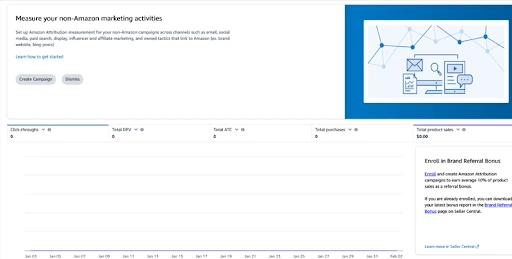
What is Amazon Attribution?
Amazon Attribution is a conversion-tracking tool for brand-registered sellers. It shows how external traffic affects Amazon sales.
First, sellers create trackable links called attribution tags. Then, they can see clicks and detail page views to understand visits. Next, they can track add-to-carts to measure purchase intent. Finally, they can measure sales and revenue to confirm conversions and total impact.
As a result, external marketing becomes clearer. In turn, sellers can invest in the channels that actually drive sales.
Why Should You Use Amazon Attribution?
Amazon favors listings that bring in external traffic. As a result, it’s a strong way to lift sales and improve organic rankings.
With Amazon Attribution, you can measure ROI and see which campaigns drive real purchases. In addition, that outside traffic can help boost your rankings. Next, you can optimize ad spend by cutting what isn’t working. Finally, you can earn extra revenue by pairing it with the Brand Referral Bonus for up to 10% back on attributed sales from external sources.
Common Mistakes Sellers Make (And How to Avoid Them)
Mistake #1 is using the same attribution link for different platforms. As a result, you can’t track performance by channel. Instead, create a unique attribution tag for each platform and campaign.
Your #2 Mistake might be sending traffic to a weak Amazon listing. Then conversions stay low because of poor images, thin copy, or bad reviews. Before you scale traffic, optimize the listing with strong visuals, clear benefits, and solid social proof.
Mistake #3 is expecting instant results. However, Amazon Attribution often reports with a 12–72 hour delay. So wait at least a week before judging campaign performance.
Mistake #4 is forgetting the Brand Referral Bonus. In that case, you miss out on up to 10% back on attributed sales. Finally, apply for the bonus so your external traffic can earn extra revenue.
Step-by-Step Guide: How to Set Up Amazon Attribution
Step 1: Sign Up
1️⃣ Log in to Amazon Advertising Console → Click Here
2️⃣ Navigate to Measurement & Reporting > Amazon Attribution
3️⃣ Click “Sign Up” and follow the approval steps
Recommended by LinkedIn
Google Ads news – week 51 🎄 🎅
Adriaan Dekker 1 year ago
📰 PPC News: Amazon Ads (W22)
🛰️ Yoann Ferrand 8 months ago
📰 PPC News: Amazon Ads (W23)
🛰️ Yoann Ferrand 8 months ago
Step 2: Create an Attribution Tag
1️⃣ Inside the dashboard, click “Create Order” 2️⃣ Select the product(s) you want to track 3️⃣ Choose the external traffic source (Google, Facebook, Instagram, etc.) 4️⃣ Name your campaign (e.g., “FB Ads – Summer Sale”) 5️⃣ Generate a trackable URL (this is your attribution link)
Step 3: Use the Link in Your Campaigns
✔️ Google Ads – Use the link in your Google PPC campaigns. ✔️ Facebook/Instagram Ads – Add the link to your ads & social posts. ✔️ Influencer Marketing – Provide influencers with the link to track their impact. ✔️ Email Campaigns – Add the link to your newsletters & promotions.
💡 Pro Tip: Shorten long Attribution links using Bitly or a custom URL for cleaner tracking.
Pro Tips & Best Practices for Maximizing Attribution
⭐ Use Multiple Channels – Test different platforms (Google, TikTok, Instagram) and analyze which works best. ⭐ A/B Test Your Ads – Run different creatives to see what drives the highest conversions. ⭐ Monitor Data Weekly – Amazon Attribution updates with a delay, so check results every 7 days. ⭐ Retarget High-Intent Users – Use your Attribution insights to retarget users who clicked but didn’t buy.
FAQs: Attribution vs. Amazon PPC
❓ Does Attribution work for organic traffic? ✅ Yes! You can track organic social posts, blog articles, email marketing, and influencer campaigns.
❓ What’s the difference between Attribution & Amazon PPC tracking? 🔹 Amazon PPC tracks conversions from Amazon Ads only. 🔹 Attribution tracks external traffic sources like Google, Facebook, & influencer marketing.
❓ Can I use Attribution with influencers? ✅ Yes! Provide influencers with a unique attribution link to track sales from their content.
❓ Do I need to be brand-registered to use Attribution? ✅ Yes, only brand-registered sellers have access to Attribution.
Final Thoughts: Why Every Amazon Seller Should Use Attribution
If you’re driving external traffic to your Amazon store, Attribution is a must for tracking & optimizing your marketing.
Amazon Attribution helps you track external marketing accurately. As a result, you can allocate ad spend more effectively. In addition, external traffic can boost your organic ranking over time. Finally, you may qualify for the Brand Referral Bonus, with up to 10% back on attributed sales.
🔹 Ready to maximize your external traffic? Start using Amazon Attribution today!
💡 Have questions about Amazon Attribution? Drop them in the comments! 👇
Ruben A.
CEO at PAS